mitproxy is a popular man in the middle proxy used in web scraping operations. However, to use it for scraping https websites the custom certificate must be installed.
For Chrome and Chromium browsers follow these steps:
- Install
mitmproxyusingpip install mitmproxyor your systems package manager like:- Ubuntu:
sudo apt install mitmproxy - MacOs:
brew install mitmproxy - Windows: download binary from mitmproxy.org
- Ubuntu:
- Run
mitmproxyin the terminal and it'll start a proxy onlocalhost:8080on your machine. - Start Chrome instance with
mitmproxyproxy attached to it:- Linux:
google-chrome --proxy-server="localhost:8080" - MacOs:
open -a "Google Chrome" --args --proxy-server="localhost:8080" - Windows:
chrome.exe --proxy-server="localhost:8080"
- Linux:
- Open
http://mitm.itin the browser and download the certificate for your system. - Install the certificate to your Chrome or Chromium browser:
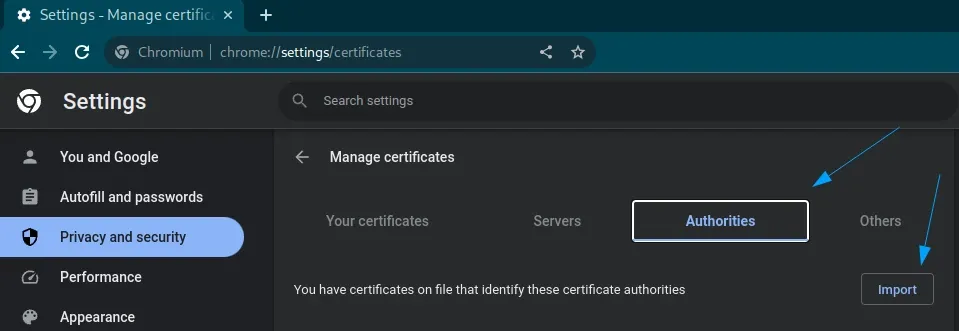
- Open
chrome://settings/certificatesin the browser. - Click on
Authoritiestab. - Click on
Importbutton and select the certificate from the step 4.
- Open
Now mitmproxy will be able to intercept and decrypt all https traffic going through it. This enables it being used with headless browser tools like Selenium, Playwright or Puppeteer.