Image scraping is becoming an increasingly popular data harvesting technique used in many applications like AI training and data classification. Making image scraping an essential skill in many data extraction projects.
In this guide, we'll explore how to scrape images from websites using different scraping methods. We'll also cover the most common image scraping challenges like how to find hidden images, handle javascript loading and how to handle all of that in Python. This guide should cover everything you need to know about image data harvesting!
Key Takeaways
Master python image scraper techniques with advanced Python methods, dynamic content handling, and JavaScript rendering for comprehensive image data extraction.
- Implement Python image scraping using requests, BeautifulSoup, and Selenium for static and dynamic content
- Handle JavaScript-loaded images with browser automation tools like Playwright and Puppeteer
- Configure image download optimization with proper headers, user agents, and proxy rotation
- Implement image metadata extraction including alt text, dimensions, and source URLs
- Use specialized tools like ScrapFly for automated image scraping with anti-blocking features
- Configure data storage and organization for efficient image collection and management
How Websites Store Images?
When images are uploaded to websites, they're saved on the web server as static files with an unique URL address. Websites use these links to render images on the web page.
Generally, image links are found within img HTML element's src attribute:
<img src="https://www.domain.com/image.jpg" alt="Image description">The src attribute refers to the image link and the alt attribute refers to the image description.
Websites can also change the image resolution and dimensions based on the user's device and display resolution. For this, srcset attribute is used:
<img srcset="image-small.jpg 320w, image-medium.jpg 640w, image-large.jpg 1024w" sizes="(max-width: 640px) 100vw, 50vw" alt="Image description">Above, the website stores different image resolutions for the same image for optimal browsing experience.
So, when web scraping for images, we'll mostly be looking for img tags and their src or srcset attributes. Let's take a look at it.
Setup
In this guide, we'll scrape images from different websites that represent different image scraping challenges. For that, we'll use multiple Python libraries that can be installed using pip terminal command:
pip install httpx playwright beautifulsoup4 cssutils jmespath asyncio numpy pillowWe'll use httpx for sending requests and playwright for running headless browsers. BeautifulSoup for parsing HTML, cssutils for parsing CSS and JMESPath for searching in JSON. Finally, we'll use asyncio for asynchronous web scraping, numpy and pillow for scraped image manipulation and cleanup.
Image Scraper with Python
Let's start with a basic image scraper using Python. We'll be using httpx for sending requests and BeautifulSoup for parsing HTML, scrape some HTML pages and extract the image data from web-scraping.dev website.
To scrape images, we'll first scrape the HTML pages and use Beautifulsoup parse for img elements that contain image URLs in either src or srcset attributes. Then the binary image data can be scraped just like any other HTTP resource using HTTP clients like httpx.
To apply this approach, let's write a short Python images crawler that collects all product images (all 4 paging pages) from web-scraping.dev/products website:
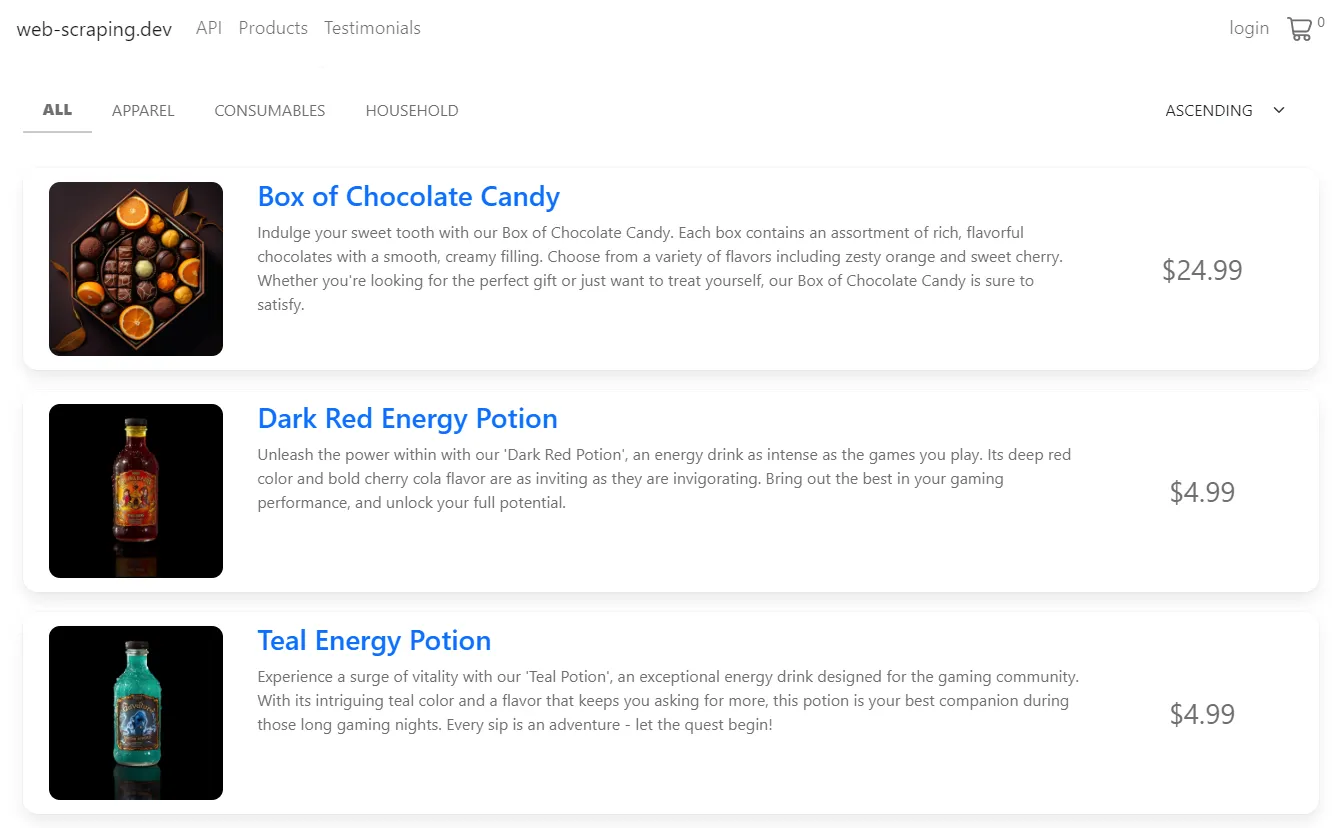
This website has multiple product pages, so let's try to grab all of them.
For that, we'll create a web crawler that:
- Iterates over pages and collects the page HTMLs.
- Parse each HTML using
beautifulsoupforimgelements. - Select
srcattributes that contain direct image URLs.
Then, we'll use httpx to GET request each image URL and download the images:
import httpx
from bs4 import BeautifulSoup

# 1. Find image links on the website
image_links = []
# Scrape the first 4 pages
for page in range(4):
    url = f"https://web-scraping.dev/products?page={page}"
    response = httpx.get(url)
    soup = BeautifulSoup(response.text, "html.parser")
    for image_box in soup.select("div.row.product"):
        result = {
            "link": image_box.select_one("img").attrs["src"],
            "title": image_box.select_one("h3").text,
        }
        # Append each image and title to the result array
        image_links.append(result)

# 2. Download image objects
for image_object in image_links:
    # Create a new .png image file
    with open(f"./images/{image_object['title']}.png", "wb") as file:
        image = httpx.get(image_object["link"])
        # Save the image binary data into the file
        file.write(image.content)
print(f"Image {image_object['title']} has been scraped") from scrapfly import ScrapeConfig, ScrapflyClient, ScrapeApiResponse
from bs4 import BeautifulSoup
scrapfly = ScrapflyClient(key="Your API key")
image_links = []
for page in range(4):
url = f"https://web-scraping.dev/products?page={page}"
api_response: ScrapeApiResponse = scrapfly.scrape(
scrape_config=ScrapeConfig(url=url)
)
soup = BeautifulSoup(api_response.scrape_result["content"], "html.parser")
for image_box in soup.select("div.row.product"):
result = {
"link": image_box.select_one("img").attrs["src"],
"title": image_box.select_one("h3").text,
}
image_links.append(result)
for image_object in image_links:
# Scrape images in the array using each image link
scrape_config = ScrapeConfig(url=image_object["link"])
api_response: ScrapeApiResponse = scrapfly.scrape(scrape_config)
# Download the image to the images directory and give each a name
scrapfly.sink(api_response, name=image_object["title"], path="./images")
print(f"Image {image_object['title']} has been scraped") We use CSS selectors to extract the title and image URL of each product box and append them to the image_links list. Then, we iterate over this list and create a PNG file for each image with the product title as the image name. Next, we send a GET request to each image URL and save the image binary data.
Here is the result we got:
Cool! Our python web crawler downloaded all images and saved them into the output folder with the product title as the image name.
Different Image Scraping Challenges
Our example Python image scraper was pretty straightforward. However, real-life image scraping images isn't always easy. Next, let's take a look at some common image scraping challenges.
Scrape Background Images
Background images are images embedded into CSS style rules. This means that the actual image URLs can't be found in the HTML. For example, this webpage has a background image:
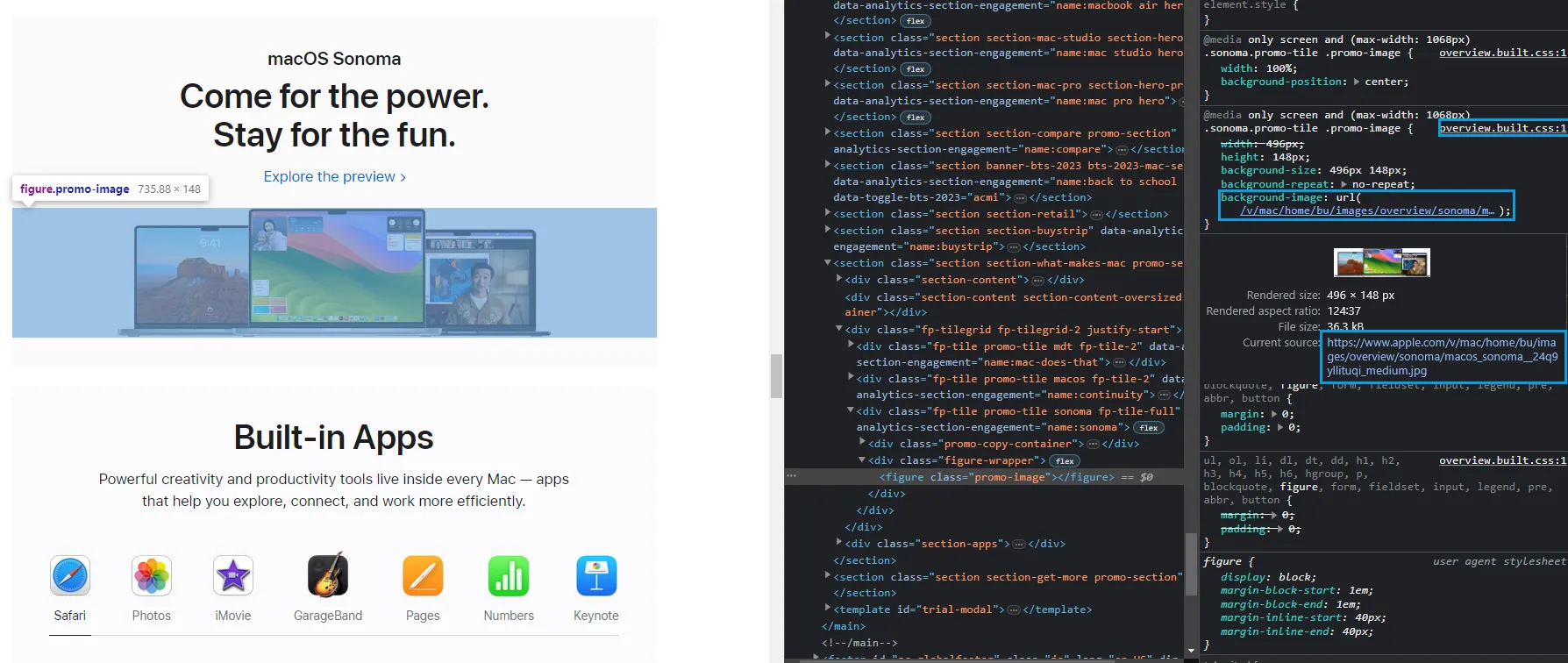
We can see the image clearly on the web page, but we can't find the actual img tag in the HTML. However, it's found in the CSS under the background-image property. In a CSS file overview.css. So, to scrape this image, we need to scrape this CSS file and extract the image URL from there.
First, to get the the CSS file link address we can use the same devtools explorer and right-click on the CSS file name:
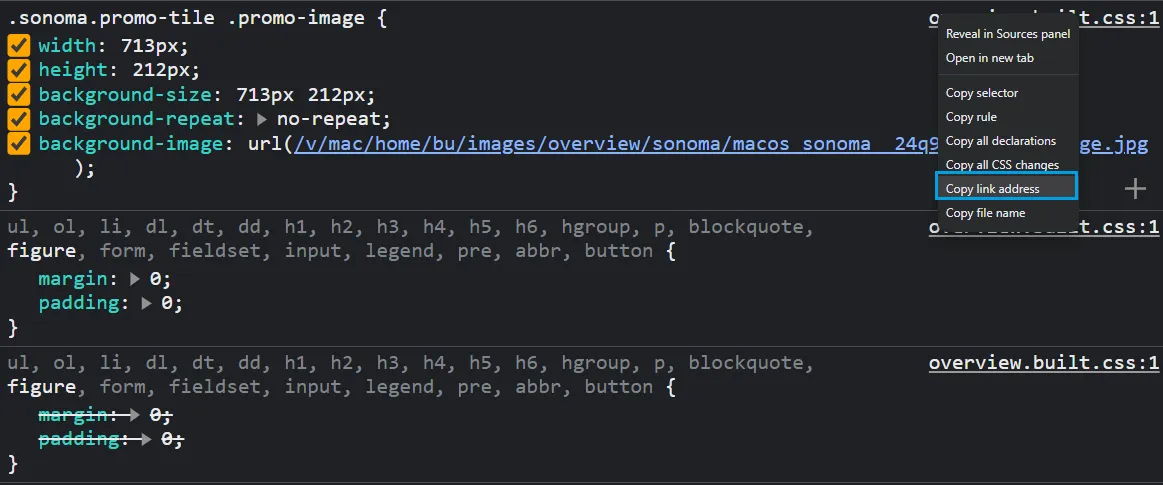
Now we can scrape this CSS file and parse it using cssutils to extract the background image URL:
import httpx
import cssutils

css_url = "https://www.apple.com/mideast/mac/home/bu/styles/overview.css"
r = httpx.get(css_url)
css_content = r.text

# Parse the CSS content
sheet = cssutils.parseString(css_content)

image_links = []
# Find all rules containing background images
for rule in sheet:
    if rule.type == rule.STYLE_RULE:
        for property in rule.style:
            # Get all background-image properties
            if property.name == "background-image" and property.value != "none":
                result = {
                    "link": "https://www.apple.com" + property.value[4:-1],
                    "title": property.value[4:-1].split('/')[-1]
                }
                image_links.append(result)

for image_object in image_links:
    with open(f"./images/{image_object['title']}", "wb") as file:
        image = httpx.get(image_object["link"])
        file.write(image.content)
        print(f"Image {image_object['title']} has been scraped")
Here, we loop through all style rules in the CSS sheet and search for all properties with the name background-image. Then, we extract all image links using the property value and append the result into an array. Finally, we use httpx to download all images using each image link.
Here is the background image scraper result:
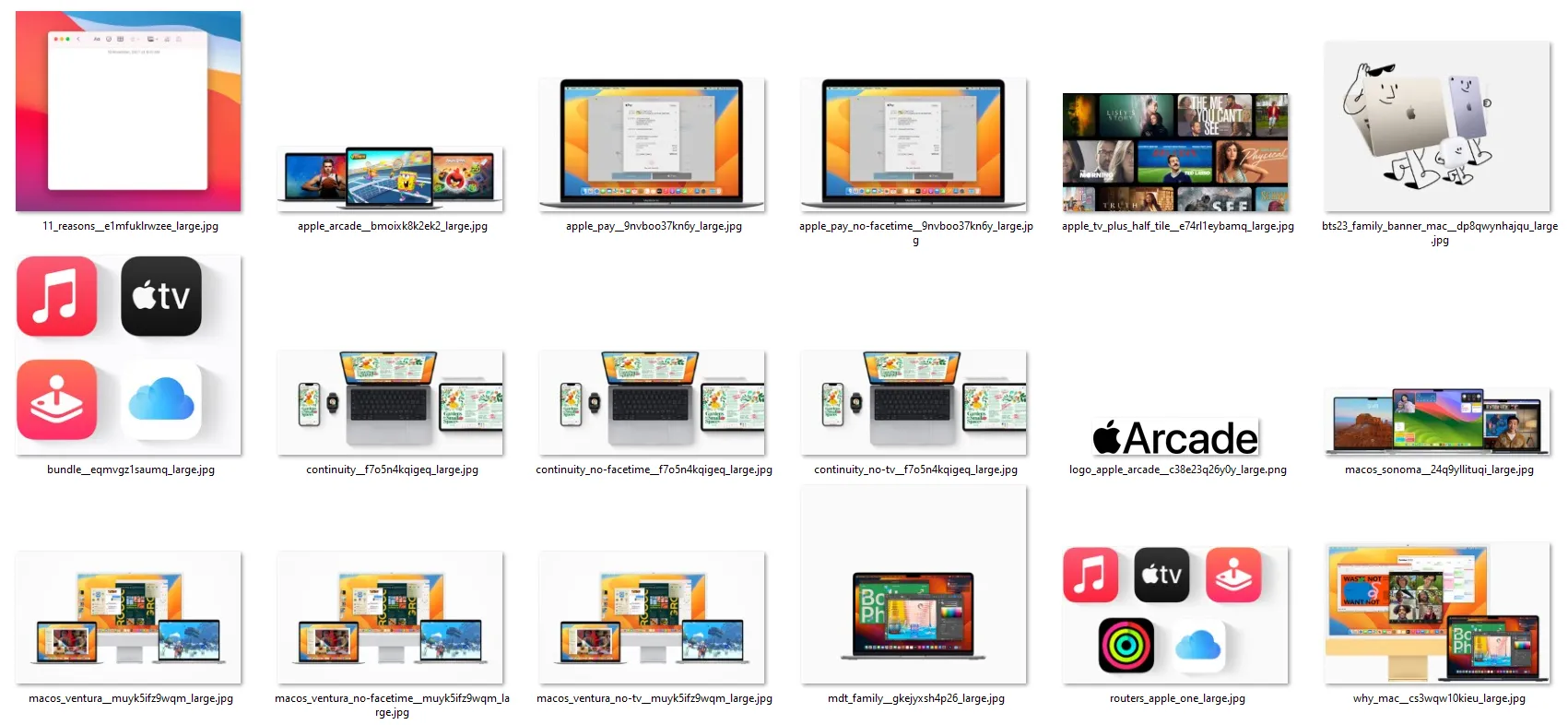
We successfully scraped all background images from this web page. Let's move on to the next image scraping challenge.
Scrape Split Images
Split images are multiple images grouped together to create one image. This type of image appears as one image but it consists of smaller images in the page HTML.
For example, the following image on this behance.net web page consists of multiple images combined vertically:
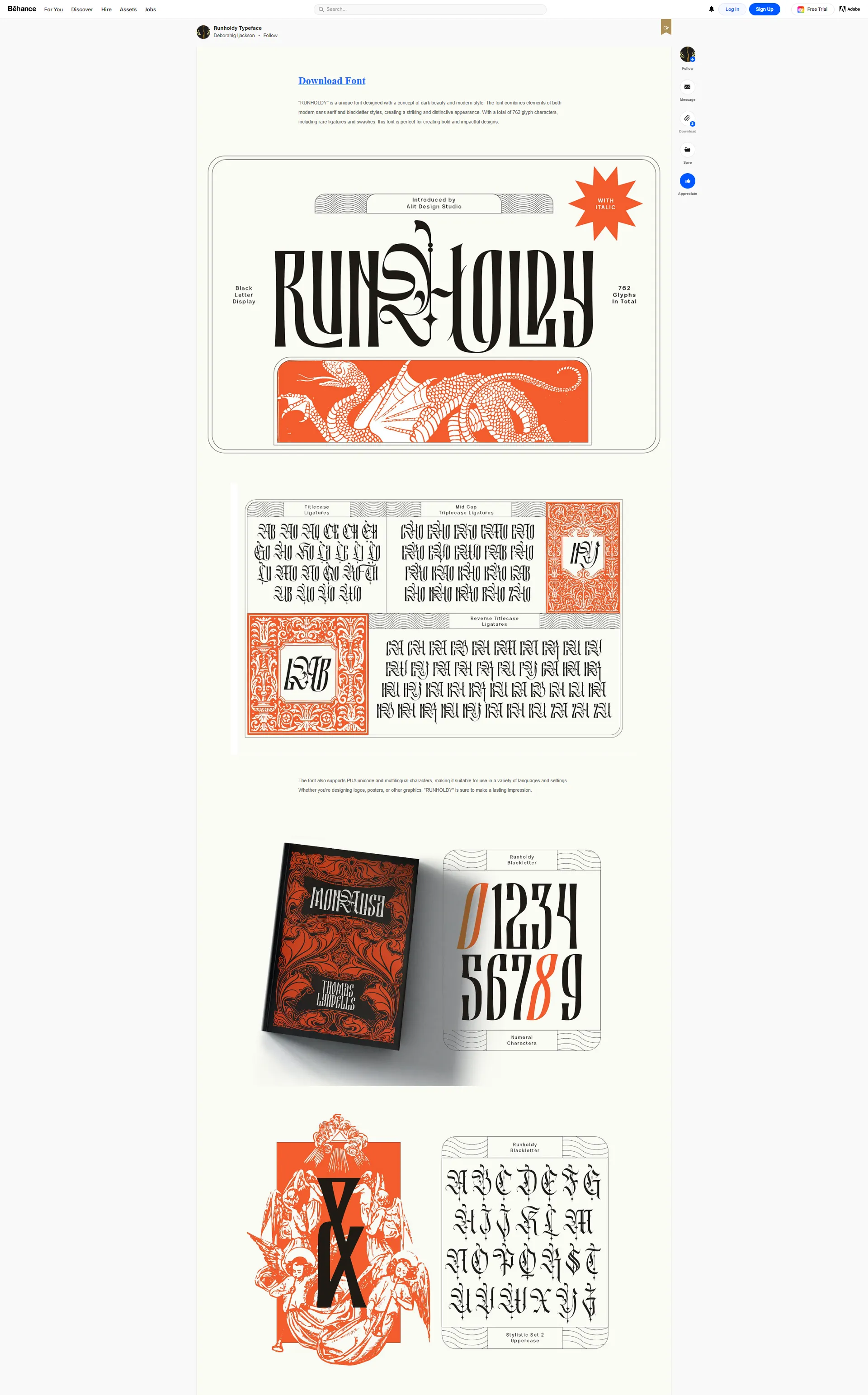
To scrape this image as it appears on this webpage, we'll scrape all the images and combine them vertically.
First, let's start with the image scraping:
import httpx
from bs4 import BeautifulSoup

# any URL to behance gallery page
url = "https://www.behance.net/gallery/148609445/Vector-Illustrations-Negative-Space"

request = httpx.get(url)

index = 0
image_links = []

soup = BeautifulSoup(request.text, "html.parser")
for image_box in soup.select("div.ImageElement-root-kir"):
    index += 1
    result = {
                "link": image_box.select_one("img").attrs["src"],
                "title": str(index) + ".png"
            }
    image_links.append(result)
    # Scrape the first 4 images only
    if index == 4:
        break

for image_object in image_links:
    with open(f"./images/{image_object['title']}", "wb") as file:
        image = httpx.get(image_object["link"])
        file.write(image.content)
        print(f"Image {image_object['title']} has been scraped")
The above image scraping code allows us to scrape the first 4 images on this webpage. Next, we'll combine the images we got vertically using numpy and pillow:
import numpy as np
from PIL import Image

list_images = ["1.png", "2.png", "3.png", "4.png"]
images = [Image.open(f"./images/{image}") for image in list_images]

min_width, min_height = min((i.size for i in images))
# Resize and convert images to 'RGB' color mode
images_resized = [i.resize((min_width, min_height)).convert("RGB") for i in images]
# Create a vertical stack of images
imgs_comb = np.vstack([np.array(i) for i in images_resized])
# Create a PIL image from the numpy array
imgs_comb = Image.fromarray(imgs_comb)

# Save the concatenated image
imgs_comb.save("./images/vertical_image.png")
Here is the split image scraper result:
Image result
Scrape Hidden Images
Hidden Hidden web data are data loaded into the web page using JavaScript. Which are found in JavaScript script tags in JSON format.
For example, if we take a look at this lyst.com webpage, we can find the image links in the HTML:
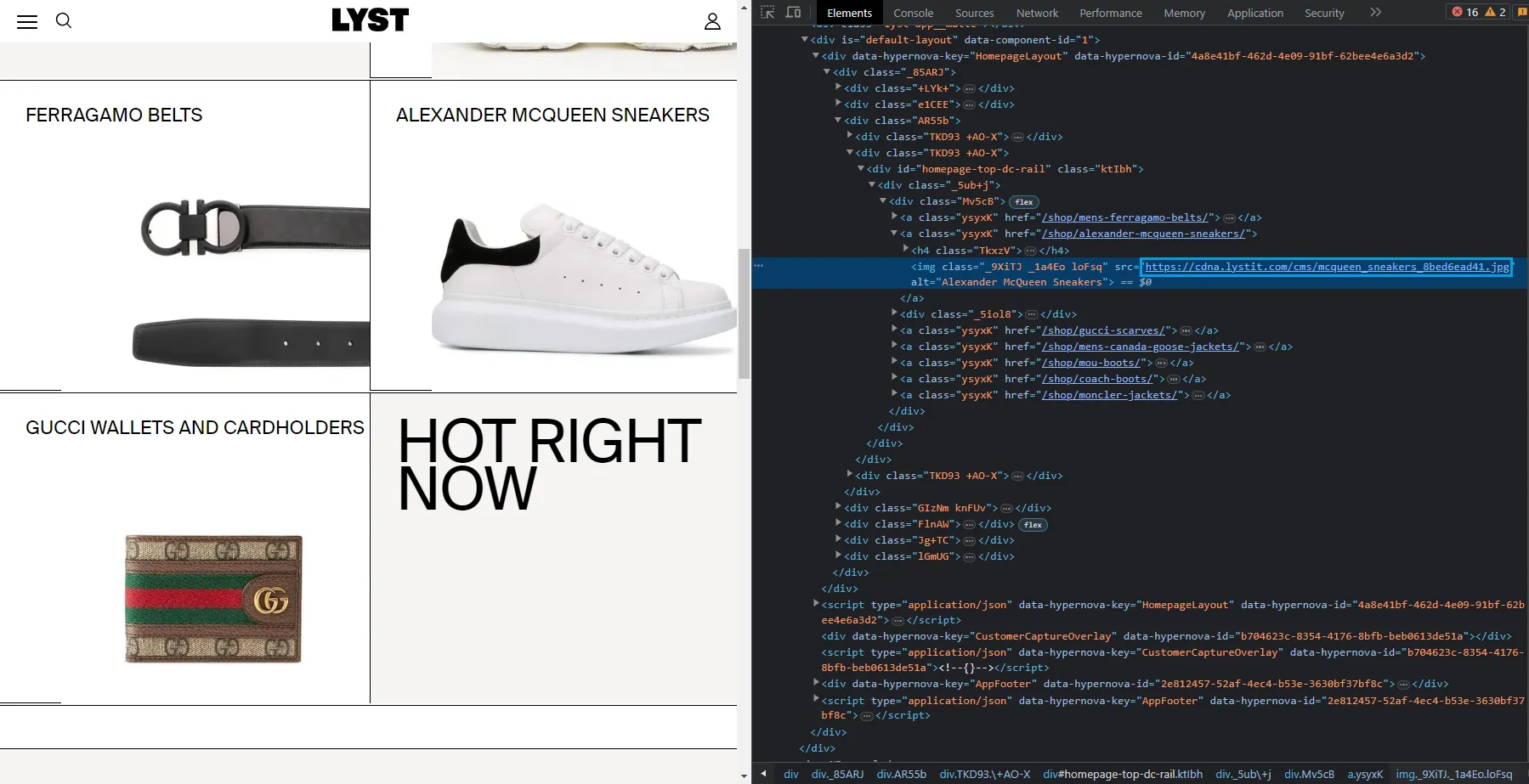
Let's try to scrape these image links like we did earlier:
import httpx
from bs4 import BeautifulSoup

request = httpx.get('https://www.lyst.com/')
soup = BeautifulSoup(request.text, "html.parser")

for i in soup.select("a.ysyxK"):
    print(i.select_one('img').attrs["src"])
By running this code, we got this output:
Output
data:image/gif;base64,R0lGODlhAQABAIAAAAAAAP///yH5BAEAAAAALAAAAAABAAEAAAIBRAA7
data:image/gif;base64,R0lGODlhAQABAIAAAAAAAP///yH5BAEAAAAALAAAAAABAAEAAAIBRAA7
data:image/gif;base64,R0lGODlhAQABAIAAAAAAAP///yH5BAEAAAAALAAAAAABAAEAAAIBRAA7
data:image/gif;base64,R0lGODlhAQABAIAAAAAAAP///yH5BAEAAAAALAAAAAABAAEAAAIBRAA7
data:image/gif;base64,R0lGODlhAQABAIAAAAAAAP///yH5BAEAAAAALAAAAAABAAEAAAIBRAA7
data:image/gif;base64,R0lGODlhAQABAIAAAAAAAP///yH5BAEAAAAALAAAAAABAAEAAAIBRAA7
data:image/gif;base64,R0lGODlhAQABAIAAAAAAAP///yH5BAEAAAAALAAAAAABAAEAAAIBRAA7
data:image/gif;base64,R0lGODlhAQABAIAAAAAAAP///yH5BAEAAAAALAAAAAABAAEAAAIBRAA7
data:image/gif;base64,R0lGODlhAQABAIAAAAAAAP///yH5BAEAAAAALAAAAAABAAEAAAIBRAA7
data:image/gif;base64,R0lGODlhAQABAIAAAAAAAP///yH5BAEAAAAALAAAAAABAAEAAAIBRAA7
data:image/gif;base64,R0lGODlhAQABAIAAAAAAAP///yH5BAEAAAAALAAAAAABAAEAAAIBRAA7
data:image/gif;base64,R0lGODlhAQABAIAAAAAAAP///yH5BAEAAAAALAAAAAABAAEAAAIBRAA7
data:image/gif;base64,R0lGODlhAQABAIAAAAAAAP///yH5BAEAAAAALAAAAAABAAEAAAIBRAA7
data:image/gif;base64,R0lGODlhAQABAIAAAAAAAP///yH5BAEAAAAALAAAAAABAAEAAAIBRAA7
data:image/gif;base64,R0lGODlhAQABAIAAAAAAAP///yH5BAEAAAAALAAAAAABAAEAAAIBRAA7
data:image/gif;base64,R0lGODlhAQABAIAAAAAAAP///yH5BAEAAAAALAAAAAABAAEAAAIBRAA7
data:image/gif;base64,R0lGODlhAQABAIAAAAAAAP///yH5BAEAAAAALAAAAAABAAEAAAIBRAA7
data:image/gif;base64,R0lGODlhAQABAIAAAAAAAP///yH5BAEAAAAALAAAAAABAAEAAAIBRAA7
data:image/gif;base64,R0lGODlhAQABAIAAAAAAAP///yH5BAEAAAAALAAAAAABAAEAAAIBRAA7
data:image/gif;base64,R0lGODlhAQABAIAAAAAAAP///yH5BAEAAAAALAAAAAABAAEAAAIBRAA7
data:image/gif;base64,R0lGODlhAQABAIAAAAAAAP///yH5BAEAAAAALAAAAAABAAEAAAIBRAA7
data:image/gif;base64,R0lGODlhAQABAIAAAAAAAP///yH5BAEAAAAALAAAAAABAAEAAAIBRAA7
data:image/gif;base64,R0lGODlhAQABAIAAAAAAAP///yH5BAEAAAAALAAAAAABAAEAAAIBRAA7
data:image/gif;base64,R0lGODlhAQABAIAAAAAAAP///yH5BAEAAAAALAAAAAABAAEAAAIBRAA
We can see that we got base64-encoded data instead of the actual URLs.
These values are placeholders until page javascript inserts real images on page load. Since our image scraper doesn't have a web browser with javascript engine, this image load process couldn't happen. There are two ways to approach this:
- Use a headless browsers and load the page to render the images.
- Find the image URLs in the HTML source code.
Since headless browsers are expensive and slow let's give the latter approach a shot. In this example, we can find these image URLs in the script tag:
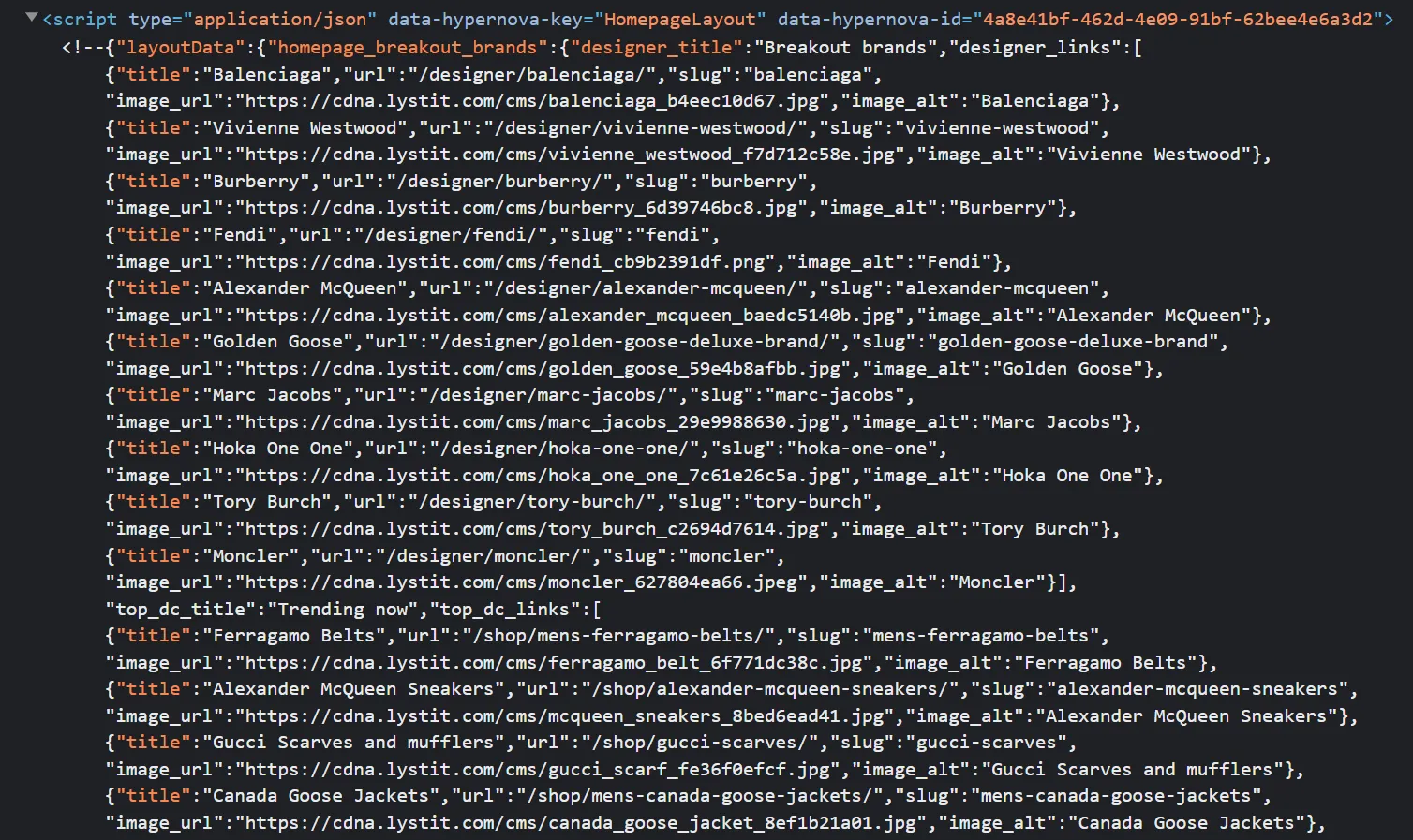
So we can scrape this HTML and find this particular <script> element for the product data JSON which contains product images.
To find image URLs in the JSON datasets we'll be using Quick Intro to Parsing JSON with JMESPath in Python which is a Python package for parsing JSON. We'll use it to search for image URLs in the script tag. Then, we'll scrape images by sending requests to each image URL like we did before. Here is how:
import httpx
from bs4 import BeautifulSoup
import json
import jmespath
import re

request = httpx.get("https://www.lyst.com/")
soup = BeautifulSoup(request.text, "html.parser")

script_tag = soup.select_one("script[data-hypernova-key=HomepageLayout]").text

# Extract JSON data from the HTML
data_match = re.search(r"<!--(.*?)-->", script_tag, re.DOTALL)
data = data_match.group(1).strip()

# Select the image data dictionary
json_data = json.loads(data)["layoutData"]["homepage_breakout_brands"]

# JMESPath search expressions
expression = {
    "designer_images": "designer_links[*].{image_url: image_url, image_alt: image_alt}",
    "top_dc_images": "top_dc_links[*].{image_url: image_url, image_alt: image_alt}",
    "bottom_dc_images": "bottom_dc_links[*].{image_url: image_url, image_alt: image_alt}",
}

# Use JMESPath to extract the values
designer_images = jmespath.search(expression["designer_images"], json_data)
top_dc_images = jmespath.search(expression["top_dc_images"], json_data)
bottom_dc_images = jmespath.search(expression["bottom_dc_images"], json_data)
image_links = designer_images + top_dc_images + bottom_dc_images

for image_object in image_links:
    with open(f"./images/{image_object['image_alt']}.jpg", "wb") as file:
        image = httpx.get(image_object["image_url"])
        file.write(image.content)
        print(f"Image {image_object['image_alt']} has been scraped")
Here, we use regex to extract the JSON data from the HTML. Then, we load the data into a JSON object and search for image links and titles using JMESPath. Finally, we download the images using httpx.
Here is the hidden image scraper result:
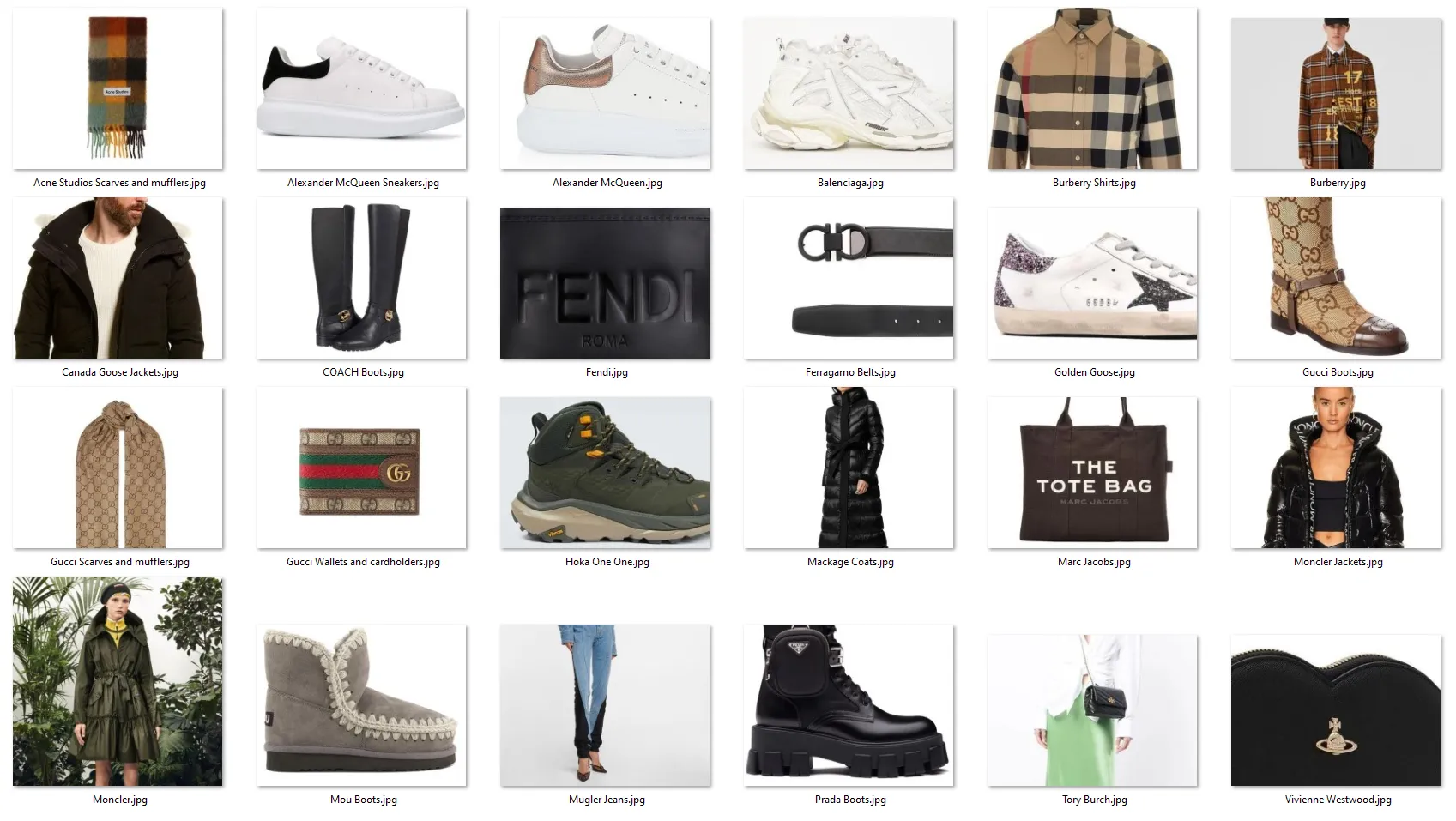
Scrape JavaScript Loaded Images
Many websites use JavaScript to render images as it makes the image process appear more smooth and dynamic. For example, let's take a look at the Van Gogh gallery:
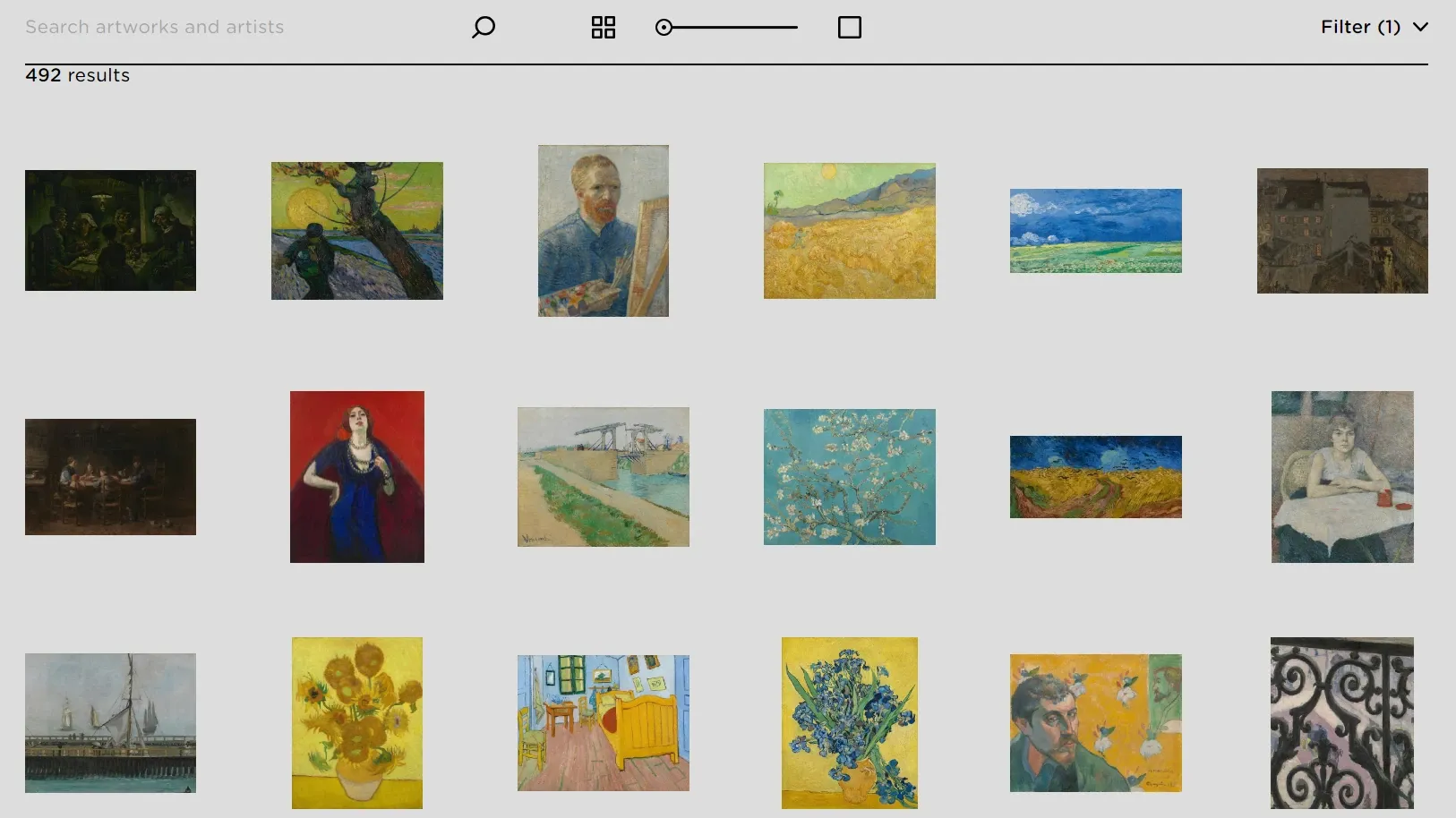
This website doesn't only render images using JavaScript, but also uses scrolling down to render more images. Which makes it even harder to scrape images. For that, we'll use Web Scraping with Playwright and Python to scroll down and render more images and scrape images using httpx:
import asyncio
from playwright.async_api import async_playwright
from bs4 import BeautifulSoup
import httpx
from typing import List

# Scrape all image links
async def scrape_image_links():
    # Intitialize an async playwright instance
    async with async_playwright() as playwight:
        # Launch a chrome headless browser
        browser = await playwight.chromium.launch(headless=False)
        page = await browser.new_page()

        await page.goto("https://www.vangoghmuseum.nl/en/collection")
        await page.mouse.wheel(0, 500)
        await page.wait_for_load_state("networkidle")
        # parse product links from HTML
        page_content = await page.content()
        image_links = []
        soup = BeautifulSoup(page_content, "html.parser")
        for image_box in soup.select("div.collection-art-object-list-item"):
            result = {
                "link": image_box.select_one("img")
                .attrs["data-srcset"]
                .split("w,")[-1]
                .split(" ")[0],
                "title": image_box.select_one("img").attrs["alt"],
            }
            image_links.append(result)
        return image_links

image_links = asyncio.run(scrape_image_links())

async def scrape_images(image_links: List):
    client = httpx.AsyncClient()
    for image_object in image_links:
        with open(f"./images/{image_object['title']}.jpg", "wb") as file:
            image = await client.get(image_object["link"])
            file.write(image.content)
            print(f"Image {image_object['title']} has been scraped")

asyncio.run(scrape_images(image_links))
Here we use the mouse.wheel method to simulate a scrolling down, then we wait for the page to load before parsing the HTML. Next, we select the highest image resolution from the data-srcest attribute and return the results. Finally, we scrape all images using async requests.
Here is the dynamic image scraper result:
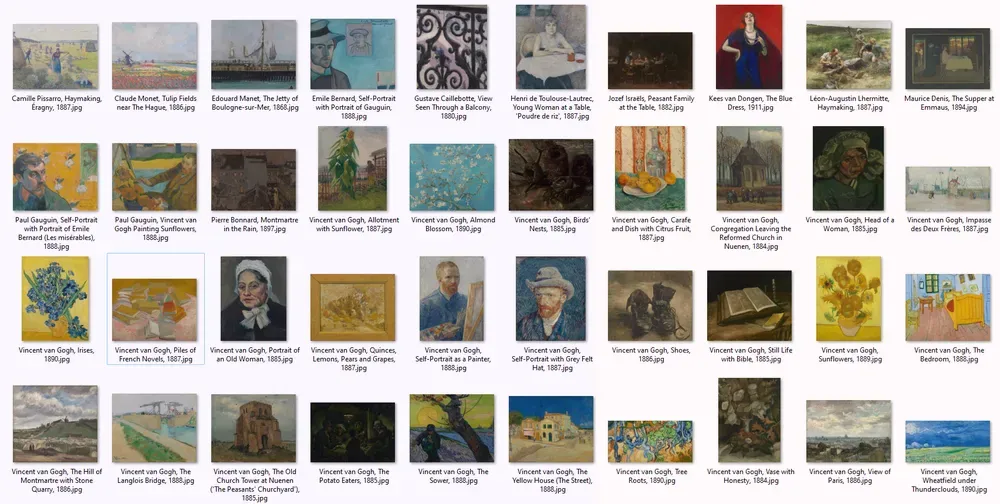
Although we scraped dynamically loaded images, running headless browsers consumes resources and takes a lot of time. Let's take a look at a better solution!
Powering up with ScrapFly
Web scraping images can be often quite straight-forward but scaling up such scraping operations can be difficult and this is where Scrapfly can lend a hand!
Here is how you can scrape the above dynamically loaded images using ScrapFly:
from scrapfly import ScrapeConfig, ScrapflyClient, ScrapeApiResponse

scrapfly = ScrapflyClient(key="Your API key")

api_response: ScrapeApiResponse = scrapfly.scrape(
    scrape_config=ScrapeConfig(
        url="https://www.vangoghmuseum.nl/en/collection",
        # Activate the JavaScript rendering feature to render images
        render_js=True,
        # Auto scroll down the page
        auto_scroll=True,
    )
)

selector = api_response.selector

image_links = []
# Use the built-in selectors to parse the HTML
for image_box in selector.css("div.collection-art-object-list-item"):
    result = {
        "link": image_box.css("img")
        .attrib["data-srcset"]
        .split("w,")[-1]
        .split(" ")[0],
        "title": image_box.css("img").attrib["alt"],
    }
    image_links.append(result)

for image_object in image_links:
    scrape_config = ScrapeConfig(url=image_object["link"])
    # Scrape each image link
    api_response: ScrapeApiResponse = scrapfly.scrape(scrape_config)
    # Download the image binary data
    scrapfly.sink(
        api_response, name=image_object["title"], path="./images"
    )
Using the render_js and the auto_scroll features, we can easily render JavaScript content and scroll down the page.
FAQ
How does web scraping for images work?
Image scraping works by parsing the HTML to get image URLs and sending HTTP requests to the image URLs to download them.
How to scrape dynamically loaded images?
Dynamic content on websites works by loading the data into HTML using JavaScript. For that, you need to scrape image URLs using a headless browser and download them using an HTTP client.
How to scrape all images from a website using Python?
To scrape all images from websites, first the images have to be discovered through web crawling then the usual image scraping process can be applied. For more on crawling, see Crawling With Python introduction.
How can I get image src in HTML for image scraping?
Image data can be extracted from img HTML elements using selectors like Parsing HTML with CSS Selectors and Parsing HTML with Xpath with parsing libraries like How to Parse Web Data with Python and Beautifulsoup.
How do I avoid getting blocked when scraping images at scale?
Image scraping at scale often triggers anti-bot protections. To avoid blocking, use proper request headers, rotate proxies, and consider using a web scraping API that handles anti-bot bypass automatically. For a detailed breakdown of image-specific blocking techniques and solutions, see our guide on avoiding image scraping blocking.
Summary
In this guide, we've taken an in-depth look at web scraping for images using Python. In summary, image scraping is about parsing scraped HTML pages to extract image links and downloading them using HTTP clients. We also went through the most common image-scraping challenges and how to overcome them:
- Background images, which are located in CSS style data.
- Split images, which are multiple images combined together in the HTML.
- Hidden images in the HTML, which are found under JavaScript script tags.
- Dynamically loaded images using JavaScript.